Online Banking Password List
Keep your online banking passwords and other access information conveniently in one place using this simple template - by Alex BejanishviliAlmost all the banks are now providing you with the facility of Bank Anywhere Anytime so you can login in your account either through web or on mobile to access your bank account. However if you are an online banking user then you would already know how difficult is it to remember the login and security information for all the bank accounts you have. Just like every other password, you cannot even remember it in your browser. Spreadsheet123's Online Banking Password List template simplifies your life by organizing all online banking login information in one place.
Online Banking Password List
for Excel 2007 & Google Sheets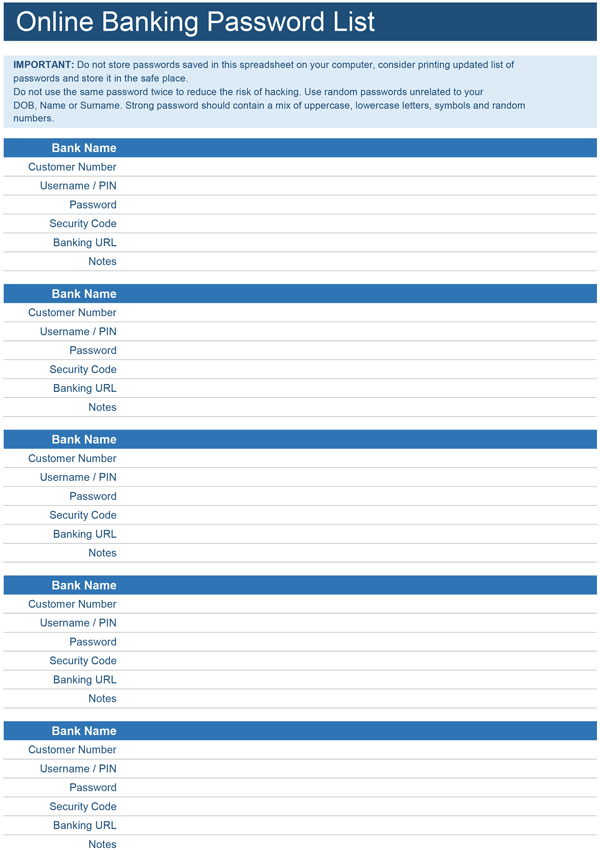
Using Online Banking Password List
There are plenty of regular utility bills and credits card bills that you need to settle every month. For this, you need to login in either your bank account or credit card online account to make these transactions. If you have your passwords and security information ready when you need them then the entire task becomes stress-free.
Online Banking password list makes your life easy by storing all your bank account information in one place. This template is organized as sections named after the bank accounts you have. Under each section, you can record following information:
- Customer Number
- Username / PIN
- Password
- Security Code
- Banking URL
- Notes - you can record here any additional information like answers to your security questions.
You can record security information of up to five banks in this template. If you have more bank accounts then you can simply create a copy of first sheet as many times as you need. This will retain the entire formatting, you can do this by right clicking on the first tab and then choosing "Move or Copy". Select the worksheet that you need to copy and tick the box next to "Create a copy" then click OK.
You can keep a printed copy of this list however it should kept securely. We recommend you to print a blank copy of this document and fill all details by hand instead of typing it. Do not keep digital copies of this document to avoid possibility of hacking. If you do keep a digital copy, protect the excel file with a password too. This is way you just need to remember one password. Also if you are not near your laptop or computer then you can keep a copy of this password protected excel file on your dropbox. If you need an access to your passwords from an iPad or iPhone, this arrangement is a bit more secure than just keeping file directly on your device.
Password is considered strong when it contains a mix of lowercase/uppercase characters, random numbers and special symbols. Avoid using same password twice.