The Ultimate 2026 Net Paycheck Calculator for Excel
Download a free Paycheck Calculator for Microsoft Excel® - by Alex Bejanishvili | Updated:UPDATE: Both versions of the Paycheck Calculator are updated with the new 2026 Federal Tax Tables and the State Tax Tables (where applicable)
Understanding your actual take-home pay is essential for personal budgeting and financial planning. While gross salary is the headline figure, the "Net Home Pay" - what actually lands in your bank account - is what matters most.
Our updated 2026 Net Paycheck Calculator is a professional-grade Excel spreadsheet designed to give you total transparency over your earnings. Whether you are an employee checking your pay stub for accuracy or a business owner estimating net pay for a new hire, this tool provides the precision you need using the latest tax laws.
Why Choose an Excel Take-Home Pay Calculator?
Many online calculators provide a quick estimate, but an Excel-based salary calculator spreadsheet offers significant advantages:
- Complete Transparency: You can audit every formula to see exactly how Federal withholding, FICA, and state taxes (like California SDI) are derived.
- Data Privacy: Unlike web apps, your salary details never leave your computer.
- 2026 Tax Ready: This version is pre-loaded with the 2026 Federal tax tables and specific updates for California state tax, including the 1.3% SDI rate.
Net Pay Check Calculator
for Excel® 2007+ & Google Docs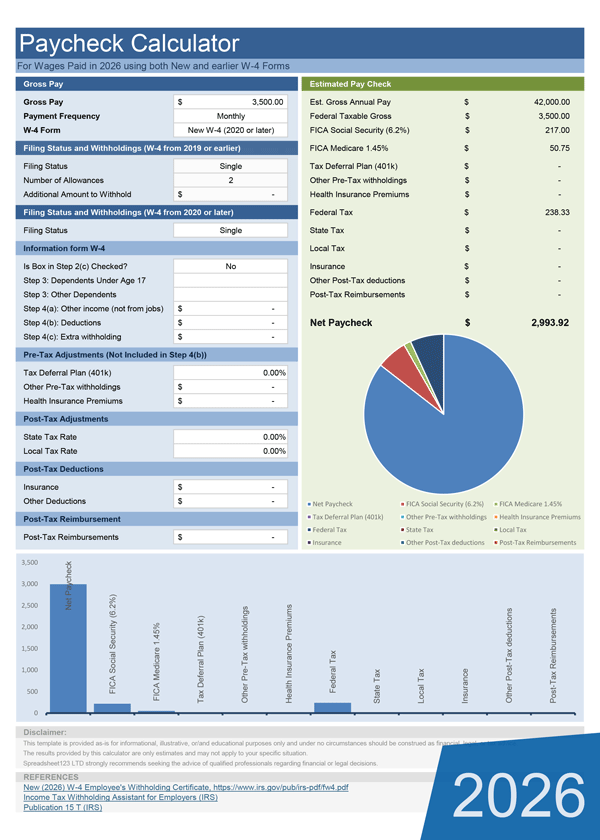
File: XLSX
File: SHEET
1.0.1
Microsoft Excel® 2007 or Higher (PC & Mac)
Not Used
Not Required
Alex Bejanishvili of Spreadsheet123.com
User License Agreement
Contact Us
Key Features of the 2026 Template
- 2026 Tax Ready: Pre-loaded with the latest IRS Percentage Method tables and the 1.3% California SDI rate.
- Dual W-4 Support: Seamlessly switch between the New W-4 (2020 or later) and the Old W-4 (pre-2020) formats.
- Privacy First: Your sensitive salary data remains on your local machine, not a third-party server.
How to Calculate Net Pay in Excel Using This Template
We have designed the template to be intuitive, even if you aren't an Excel expert. To compute your net paycheck, follow these steps:
- Input Gross Earnings: Enter your gross pay per period and select your frequency (Weekly, Bi-weekly, Monthly, etc.).
- Select Your W-4 Version: The spreadsheet supports the New W-4 (2020 or later) and the Old W-4 (pre-2020). This is crucial because the IRS changed withholding methods significantly in 2020.
- Adjust for Deductions: Input pre-tax deductions like 401(k) contributions or health insurance. These lower your taxable income and increase your net pay efficiency.
- Review the Net Home Pay: The calculator instantly subtracts Social Security (6.2%), Medicare (1.45%), and Federal/State Income Tax to show your final take-home amount.
Net Pay Check Calculator (California)
for Excel® 2007+ & Google Docs
File: XLSX
File: SHEET
1.0.1
Microsoft Excel® 2007 or Higher (PC & Mac)
Not Used
Not Required
Alex Bejanishvili of Spreadsheet123.com
User License Agreement
Contact Us
Specific Coverage for California Employees
California has one of the most complex withholding structures in the US. Our California Net Paycheck Calculator includes:
- Updated 2026 SDI Rate: Automatically calculates the 1.3% State Disability Insurance tax.
- CA Standard Deductions: Integrated 2026 benchmarks ($5,706 for Single, $11,412 for Married).
- Percentage Method Withholding: Uses the official EDD schedules for high-precision results.
Model Your Pay for Financial Planning
One of the best uses for this paycheck calculator spreadsheet is "modeling." By changing your 401(k) contribution percentage or adjusting your W-4 allowances, you can see exactly how your net pay changes. This allows you to optimize your withholdings to avoid a large tax bill (or a massive refund) at the end of the year.
Need to track your hours before calculating pay? Try our Weekly Timecard Template or our Timesheet for Multiple Jobs.