
Personal Monthly Budget Planner
Create your monthly budget with ease, using this budget planner - by Alex BejanishviliThe Personal Monthly Budget planner spreadsheet is a useful tool which would enable you to allocate a monthly budget for various expenses at the beginning of each month and monitor the divergences between the planned and the actual expenses. You can efficiently allocate budget for several categories and keep a record of any expenses incurred in those categories within the month. Our personal monthly budget worksheet includes the income section, where you keep records of your monthly income, including, but not limiting to wages, interest/dividends, refunds/reimbursements, transfer from savings, etc. This spreadsheet contains a range of categories, such as home, daily living, transportation, etc. The purpose of this is to record all sorts of expenses you might incur throughout a single month. We recommend updating your budget regularly. This helps to keep an eye on categories where you may be overspending.
The month's total section located at the top right corner of the worksheet conveniently provides the summarized budget details for the month at a glimpse. This spreadsheet has derived from the personal budget spreadsheet that helps with tracking annual budget.
Personal Monthly Budget
for Excel 2003+, Google Sheets & OpenOffice.org Calc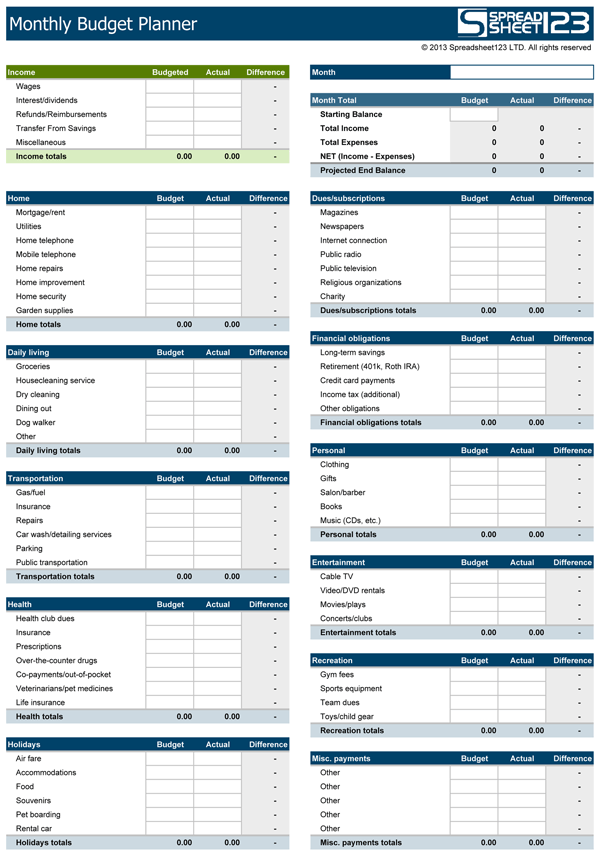
Using Monthly Budget Spreadsheet
Begin by downloading the template and recording your income details in the first table from all sources. There are various categories of the income, such as:
- Wages
- Interests / Dividends
- Refunds / Reimbursements
- Transfer from Savings
- Miscellaneous
Now allocate a budget for every type of expense at the beginning. You should regularly update the details for the actual expense incurred under each head. The sheet allows you to set budget for each type of expenditure, keeping your income heads in mind. The net value of each subtable is calculated separately. Monthly analysis helps in getting a better idea of the overall budget targets a person sets and the amount that he/she is able to save in actuality. It also helps you in making better decisions on your monthly savings and expenditures to increase your savings.
The spreadsheet enables you to maintain the record of each penny spent under the following categories:
- Home
- Daily Living
- Transportation
- Entertainment
- Health