Christmas Budget Template
Free holiday spending and gift planner for Excel & Google SheetsPlanning for the festive season is exciting, but holiday expenses can add up quickly without a clear tracking system. While gifts are usually the largest expense, ancillary costs like cards, wrapping materials, postage, and extra holiday meals often catch shoppers by surprise.
This free Christmas Budget template offers a clean, single-page worksheet to plan your spending before heading to the shops, track actual costs as purchases happen, and finish the holidays without lingering debt.
Description
The template allows you to list every gift recipient and allocate a realistic spending limit for each person. When a gift is purchased, you simply enter the final price paid into the Actual column. The worksheet immediately calculates the difference, displaying whether you are under budget or facing a shortfall on that item.
At the top of the worksheet, an automated counter tracks how many gifts you have purchased out of your planned total. The summary section also highlights your overall spending status with simple directional indicators, so you can see your net surplus or shortfall without sifting through rows of data.
To make sure your holiday budget covers everything, the worksheet includes dedicated categories for all typical holiday costs:
- Gifts: List individual recipients and assign target spending limits.
- Gift Wrapping Supplies: Track wrapping paper, ribbon, gift bags, boxes, and tape.
- Holiday Postcards & Postage: Account for greeting cards, photo prints, envelopes, and postage stamps.
- Decorations: Manage costs for Christmas trees, indoor and outdoor lighting, wreaths, and ornaments.
- Food & Entertaining: Budget for holiday dinners, extra party groceries, drinks, and restaurant meals.
Christmas Budget
for Excel 2007 & Google Sheets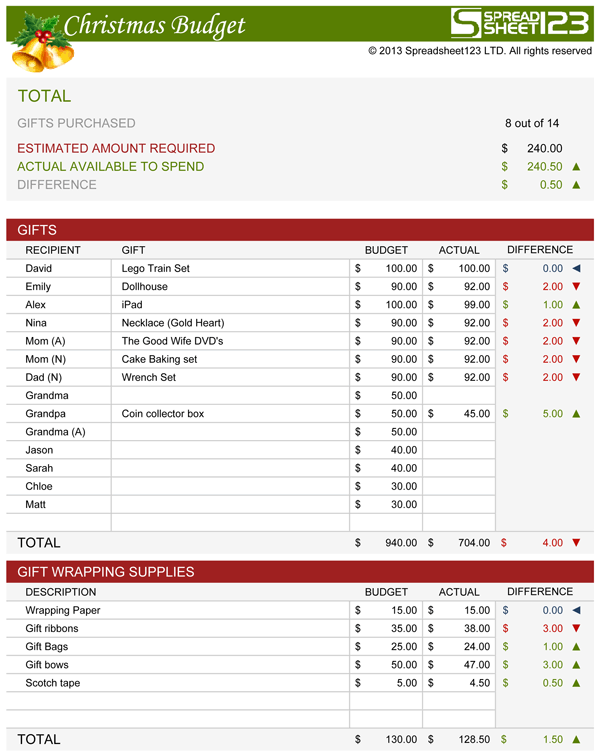

Using the Christmas Budget Worksheet
Entering multiple purchases for a single person
If you buy several smaller gifts for one recipient, you do not need to add extra rows. You can record the amounts directly in the Actual column as a standard formula, such as =14.50+8.99+22.00. Excel and Google Sheets will calculate the total automatically while keeping each individual purchase visible in the formula bar.
Adding and removing rows safely
You can customize the recipient list or any spending section to fit your household. When adding rows, always insert them between existing rows rather than beneath the final entry. This ensures that the existing SUM formulas expand automatically to include your new rows without requiring formula adjustments.
Managing spending variances
Real-world shopping rarely matches estimated figures to the penny. If you spend more than planned on a particular gift, review your remaining list and reduce another allocation by that same amount. Catching these small variances in real time keeps your net holiday spend balanced.
Formula integrity
The calculation tables rely on standard SUM and IF functions without any macros or background scripts. Avoid typing manual numbers over calculated cells in the variance columns or category headers, as this will overwrite the automatic totals.
How to Keep Your Holiday Spending Under Control
Staying on budget during the holidays comes down to deliberate structure rather than restrictive cutting.
Start by setting a firm total dollar amount for the entire holiday season before writing down names or looking at gift ideas. Once that top-line number is set, subtract your planned secondary costs: wrapping paper, postage, decorations, and food. The balance that remains is your true gift-buying budget.
Divide that remaining fund among the people on your list. Assigning a specific spending limit to each person removes impulse purchases and gives you a concrete reference point when browsing seasonal sales.
Log receipts immediately after shopping rather than setting them aside until the end of the month. Updating your sheet directly from your mobile device or desktop keeps your remaining balance accurate and ensures you head into the new year with your finances intact.