The idea of creating this sales invoice template came to me when my wife, who is the owner of the small business company that delivers office supplies to many other small businesses, asked me to find a low cost, reliable and simple invoicing solution for her business. Most of the billing software that I found was not really suitable, expensive, flexible enough or customizable, so instead of purchasing just some sort of invoicing software I have decided to create the sales invoice spreadsheet in excel.

Sales Invoice for your Business

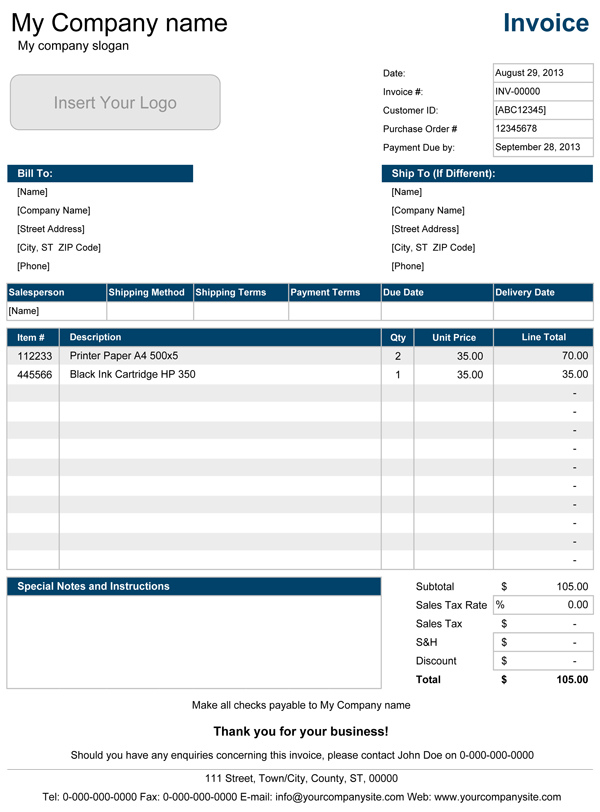
The sales invoice for excel includes shipping information, catalogue item number and special notes and instructions to you buyers. It also allows you specify the payment terms, item quantities, tax rate and shipping and packing fees.

If you are on a lookout for a low-cost invoicing solution for your business, then this excel invoice will tick all boxes for you. Saying this from my personal experience, I also recommend to use this template with corresponding Purchase Order and Packing Slip, that do have pretty much the same look and feel as my sales invoice, specifically created to work with each other to simplify your work processes, unless of course you need something much simpler like this free Free Invoice Template.

Below on this page I have provided a short instruction on how to customize and use this service invoice.

Free Sales Invoice

for Excel®, OpenOffice & Google Docs
Sales Invoice Template
Download NowFile: .XLS Size: ~107KB
Template Specifications
Version
SI 1.01 (Trial)

Requirements
Microsoft Excel® 2002(XP) or Higher

License
User License Agreement

Help & Questions?
Contact Us

Support
Visit Support Page

Sales Invoice Pro

Professional Version SI1.21
$ 14.95


Contains Bonus Content Immediate Download
Sales Invoice Pro

Three Professional Sales Invoice templates, each of which can be customized to meet requirements of your business.

Content of the purchase:
Professional Invoice - unlocked version of our free sales invoice.
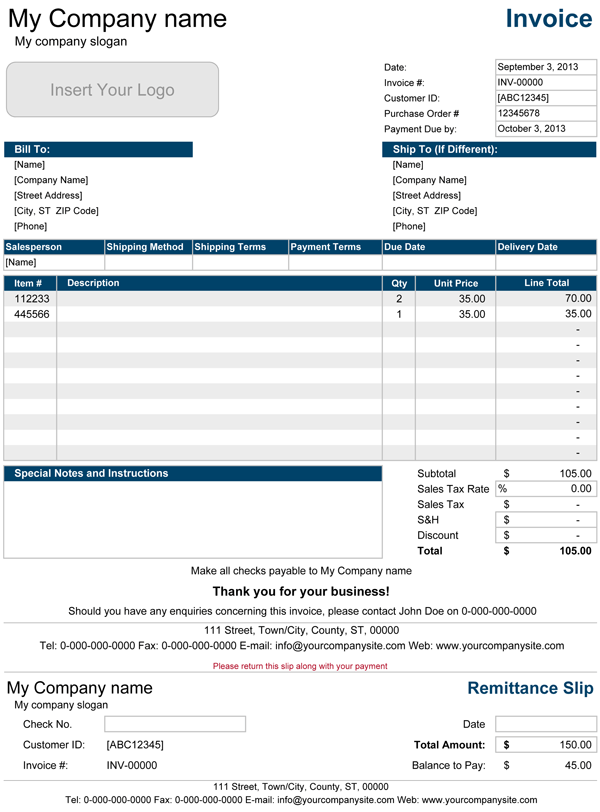
Invoice with Remittance - contains simple Remittance Slip, that is used as a reference.
Invoice with Products List - is exactly identical to Professional Invoice template except that it also contains a Products List. Products List can include a product code, short description and unit price.

All of Spreadsheet123 trademarks, logos, links and copyright notices are not included within any printing areas of the template and will not be shown when printed.

Specifications of the Commercial Version
  • Unlocked
  • Contains Fields for: Logo & Company info
  • Ability to add more rows
  • Technical Support (for 90 days)
  • 3 Bonus Spreadsheet Included
Template Specifications
Version
SI 1.21

File Type
zip

File Size
~1.20 MB

Requirements
Microsoft Excel® 2002(XP) or Higher
(PC & Mac)

License
Company Use EULA

Technical Support
Support & Questions
24x7 via E-mail

Support
Visit Support Page
Bonus Downloads

Bonus #1: Sales Invoice with Remittance

A modified version of the sales invoice that includes a remittance slip, which also performs all calculations automatically with inclusion of an outstanding balance, if payments are made partly.
See screenshot

Bonus #2: Invoice with Products List

Yet another modification that contains a Products List on the separate worksheet and can contain large quantity of products. This modification saves time on typing in your product description, product code and unit prices, instead it lets you select products in products/description column directly from the drop down menu and automatically updates cells with code and price.
See screenshot

Bonus #3: Sales Quote

Almost identical to the sales invoice, with few minor modifications that changed it in to a Sales Quote Template, which is suitable to use with our sales invoices.
See screenshot

Buy unlocked version of Sales Invoice Template risk free with 90 day full money-back guaranty!

Configure your browser to allow pop-ups before proceeding to payments screen.

If for any reason you are not able to download this template after making a payment through PayPal, use our Contact Us form to contact us with your Paypal Transaction ID.

Using this Sales Invoice.

Customizing template to your business.

Update all necessary fields with your company information.

1. Change all values in the square brackets [...] - values applicable to your company need to be replaced with your company information.

2. Company Logo - insert your company logo by going to your menu Insert > Picture > From File... (only available in unlocked version).

3. Company Name - Change it to the name of your company, this will also automatically change "Make all cheques payable to [Your Company Name]" field below.

4. Salesperson - Change it to the name of the person responsible (Eg. Sales Manager), this will also change the name of the contact person.

5. Tax Rate - Change the tax rate to the required rate.

6. Bank Account, Tax and Company Registration Details - In some countries it is a required by law to provide your company registration and tax and bank account details to the customer on every issued invoice. Unless it is required you can delete the entire section by selecting it with your mouse and hitting a delete button on you keyboard.

7. Cheque Payments - this field is automated and will therefore change automatically once you change the name of the company at the top of the invoice. If cheques required to be payable to any other than your company name, you can manually override the formula in this field. (only available in unlocked version).

8. Contact Information - Change your contact information (eg. Phone, Fax, e-mail, postal address).

9. Saving Template - Save the updated document as invoice_template.xlt file any preferred folder on your computer (Eg. My Documents > Invoices).

Preparing the Invoice for your customers.

Update all necessary fields with new customer information.

Date - the date will change to today's date automatically each time you open your document, but you can manually override the formula in this field to display the date of issue.

Invoice Number - assign the number to your invoice that must be unique for each new invoice, you can start by using 00001 for the first customer. You must save the invoice with the same name as the invoice number (eg. if invoice # is 00001 than the saved file name must be 00001.xls), this will help you to keep track of your invoices and makes searching for it way easier.

Customer ID - This cell is for unique customer number which will help to identify the customer and may contain full information about your customer (Eg. address, contact phone and fax number, e-mail).

Purchase Order Number -If your customers use a purchase order form to order and purchase your products, then you may want to specify the purchase order number on the invoice..

Bill To - Your customers name and address where the goods will be delivered and will also be used to issue the invoice.

Ship To - Name and address of alternative delivery location if different from Bill To address

Shipping Method - Here you can specify your courier service (Eg. DHL, UPS or other).

Shipping Terms - Here you can explain the terms of the shipping, it can be a discounted shipment term for goods over certain amount or similar.

Payment Terms and Due Date - here you should explain to your customer the terms of payment (eg. immediate payment or within 30 days of issue) and also the date when payment is due.

Description, Quantity and Unit Price - Provide a short description of the Product (Eg. Printing Paper), assign unit price (per one unit) and quantity ordered.

Printing and sending your Invoice.

You can print your saved invoices on the standard printer on an A4 format page in portrait or landscape depending on the format that you choose to use, then send it by standard mail service, but the much quicker way is to print it as PDF with help of a PDF conversion software like Adobe® Acrobat or similar, which if you have one of course, usually will be shown up as a separate printer in a Devices and Printers panel of your computer, and then emailed to a customer.

Invoice Related Frequently Asked Questions

Most of general question related to sales invoice can be found at Wikipedia.com, but I have also selected few questions asked by visitors answer to which is covered in my Small Business Invoicing article, in fact I would recommend to read it through since I have shared few ideas that can help using this invoice, which you may also find useful. If you don't see the question that bothers you in this list, you can just contact us.

Other Free Invoice Templates

Rate and Review this Sales Invoice Template

LIKE THIS TEMPLATE?
STAY CONNECTED