Packing Slip Template
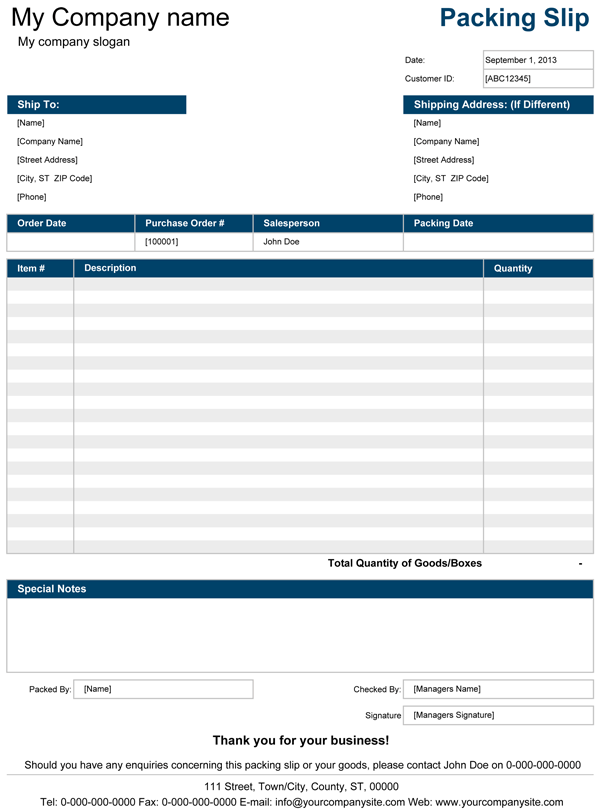
The free Packing Slip template, originally designed as corresponding template for both sales invoice and purchase order, with intended use in a small business that sells and delivers products. This spreadsheet in fact was created from our sales invoice and in many ways replicates the original. Some businesses would usually use packing slip, which clearly indicates quantity of goods delivered and most importantly contains information on any undelivered boxes or items, as document that is sent to the customer along with shipment instead of sending invoice, which in a way, provides a good way to communicate with a customer and helps to avoid any confusion especially in the event where payment is made in advance.
If you already using our service invoice, we would recommend to download this packing slip and use as corresponding template that can for sure save you some time and if not then we would strongly advise to use both.
Free Packing Slip
for Excel®, OpenOffice & Google DocsTo make processes simpler for customizing template to your business requirements and corporate style, we have used the same traditional design that's been used for many other templates in our invoicing collection, which you can see on the screenshot images.
Free packing slip template includes two different templates, in portrait and landscape format, all on the separate worksheet, each of which can change colours by selecting an appropriate one from the drop down menu. One of the templates contains an extra column, that is used as a checkbox for placing a "tick" beside the product that was checked.
Preparing and sending your packing slip: We recommend reading our small business invoicing article that explains most of what you may need to know to customize and prepare your packing slip.
Tip: Always send 2 copies of the packing slip, one of which can be returned back to you, preferably with a signature of your customer, that can be used as a prove of delivery and where you can obtain most correct information when preparing invoice.
by Alex Bejanishvili of Spreadsheet123.com
PS 1.01
Requirements
Microsoft Excel® 2002(XP) or Later
License
User License Agreement
Help & Questions?
Contact Us
Support
Visit Support Page
Packing Slip Pro
Professional Version PS1.11
The pro version of our Packing Slip template offers slightly more advanced design and functionality that allow to automate the processes even more and decrease time that is spent on creating a packing slips to the minimum, so that you can concentrate on the things that are more important. In this particular version you can create a list of products that your company sells and then select products from the drop down list in the "Description" column each time you create new packing slip for a client.
See screenshot
All Spreadsheet123 trademarks, logos, links and copyright notices are placed outside of printing areas and will not be shown when printed.
Specifications of the Commercial Version
- Unlocked
- Contains Fields for: Logo & Company info
- Ability to add more rows
- Contains "Products List" worksheet
- Technical Support (for 90 days)
- 2 Bonus Spreadsheets are Included
PS 1.11
File Type
zip
File Size
~84.0 KB
Requirements
Microsoft Excel® 2002(XP) or Higher
(PC & Mac)
License
Company Use EULA
Bonus #1: Packing Slip (Customers List)
This is version is a modified version of the packing slip with products list that contains Customers List instead, that can include your customer details and contact information. This gives a good advantage and allows to keep all customer details in one place. Another advantage is that you will only have to enter a customers ID and all customer fields in Ship To section will be updated automatically providing that your customers list already contains details of that customer of course. See screenshot
Bonus #2: Packing Slip (Backorder Slip)
Yet another modification that has an extra column named backorder which calculates the difference in quantities between goods ordered and shipped goods, that creates a simple backorder list. See screenshot
Buy unlocked version of this Packing Slip Template risk free with 90 day full money-back guaranty!
Configure your browser to allow pop-ups before proceeding to payments screen.
If for any reason you are not able to download this template after making a payment through PayPal, use our Contact Us form to contact us with your Paypal Transaction ID.
Using this Packing Slip Template
No matter which version of packing slip you decide to use, there are few things that you should be aware. Some cells contain formulas that will update automatically each time you open your template such as "Date" for instance, therefore we recommend to update those cells manually when you create new packing slip for a client.
Saving packing slip: We recommend saving your customized spreadsheet as .xlt (excel template) file, which will appear in you favorite templates. This helps to save each prepared packing slip as new spreadsheet and will also prevent from saving any unnecessary details on the original template file.
Here is an idea for you: If you use packing slip with backorder column, you can then send partial sale invoice to your client for a delivered goods, but if your client has an account in your company then instead of sending invoices you can use account statement that you can send at the end of the month for instance.
Other Free Packing Slip Templates
- Packing Slip - on Microsoft Office Online.
Share our Packing Slip Template
Share Our Packing Slip Template
If you found our packing slip useful for you, think about others too by providing a link from your website, blog, Facebook, twitter or whatever you use by using the HTML code provided below. Thank you in advance.