Work Shift Schedule
Create printable staff rotation tables using this shift schedule template - by Alex BejanishviliCreating employee work shift schedule has never been an easy task, especially in the business environment with 12 or 24 hour operation, where work shifts are dynamic, such as restaurants or hotels. Work hours of each employee can vary from week to week depending on the requirements of the business, which can make a tasks like creating weekly staff rotation extremely difficult and time consuming.
There is a number of staff scheduling systems on the internet, however, most of this systems are either expensive or pretty complicated to use. To overcome all complications, we have decided to create our own work shift schedule for excel, program with which most people is already pretty familiar, which makes it very easy to use and maintain and to top it all up, also customizable so it can meet requirements of your business.
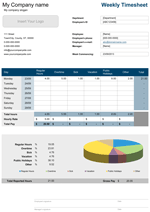
The template is capable of summarizing working hours assigned to every employee individually for every given shift as well as summarizing hours worked on the weekly basis including overtime, paid vacations and public holidays, not to mention that spreadsheet gives user an ability to create with ease, printable staff rotation schedules and also print individual timecards for employees. In addition, work shift schedule can calculate weekly labour overall cost and cost of labour in all departments individually, helps to not over or under staff the departments while creating staff rotation schedules and at last has pleasant interface with HR dashboards.
Work Shift Schedule
for Excel® 2003+
File: XLS
File: XLSX
1.0.3
Microsoft Excel® 2003 or Higher (PC & Mac)
Not Used
Not Required
Alex Bejanishvili of Spreadsheet123.com
User License Agreement
Contact Us

.
Microsoft Excel® or Higher (PC & Mac)
Not Used
Not Required
via Email 24x7
Description
Before I dive into explaining of what's what, I need to mention that the trial version of the work shift schedule, which you can download free of charge is limited for use with only small number of employees, ten to be exact, but this is not going to restrict your abilities from fully testing this spreadsheet.
When you open the work shift schedule for the first time, you will notice that spreadsheet consists from several tabs that are all connected together using formulas and functions. The template is simple plug and play, which means you do not even need to make any changes, unless you prefer to customize it to your specific requirements. You can begin by exploring the settings tab, where you can make most of the general settings, such as enter the departments relevant to your organization, select hourly format or select relevant payment settings for overtime and public holidays.
I will briefly go through all of the tabs, so that you can have a general idea of what you need to do and how to do it, you can also find more detailed information on the "Help" tab of the work shift schedule spreadsheet.
Employee List
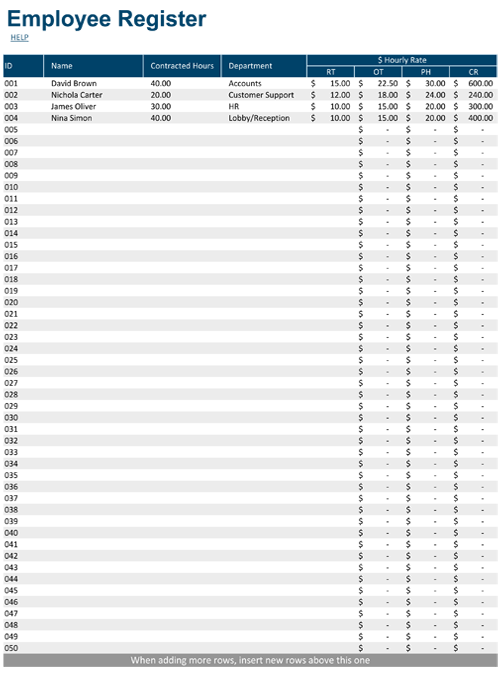
The name of the tab already suggests exactly what we are going to have to enter here. As you might have guessed, this is the simple database that contains all basic information about employees, their contracted work hours, departments in which they are employed and their hourly rates.
Work Shift Schedule
The work shift schedule is basically the main worksheet where you'll be spending the most of your time than anywhere else on this template. All of the settings, as well as all other entries you are going to make will reflect here. The names of the employees are transferred automatically from the employee list including departments in which they work (the last is done purely for statistics, but we will cover this little later). The process of assigning shift times consists in making simple selections of the shift start and end times from the drop-down, in which you also have option to select other pre-set days, such as days off work (OFF), public holidays (PH), holidays (H) and more, all depending on your requirements. The total time that you assign to each employee is displayed in the column ladled "Total Time" giving you a pretty clear indication of how many hours you have already assigned to the employee, the column next to the total time on the other hand, uses conditional formatting to highlight cell in blue or red to help you when you have missed out on something and also when you assign some extra time by accident.
Time Card
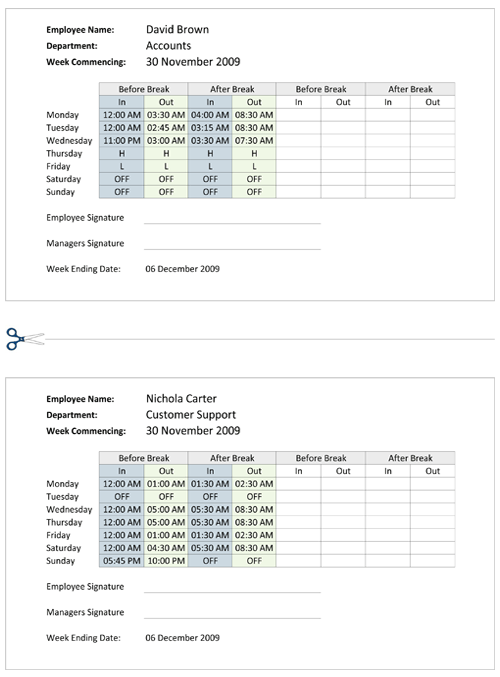
The time card tab is a simple addition, which can help you to print individual time cards for all the employees, contains two time cards for two employees on the single page to save ink and paper, with separation line in the middle. Time card contains information copied from the work shift schedule tab, which is specific to the selected employee and also empty cells for recording clock in and clock out time.
Salary Budget
Any organization, especially those with many different departments, have to set and maintain salary budget, which helps them to maintain productivity without compromising on profitability and helps them to control occupancy within the departments and overall occupancy and attendance. I won't be talking in details about how or why salary budget is important for organization, it is a subject for another discussion. The budget part is fairly simple and automated in many ways, which means that you will have to do as little as possible, but at the same time getting most results in for further decisions.
Attendance and Occupancy
Both, attendance tab and occupancy tab are very much alike, except that all information on the attendance tab is displayed in numbers, when occupancy displays all the same information in percentages and shares, giving you the statistical information about occupancy, absence, vacations, sicknesses and more. This information is necessary when making decisions when replacing employee, who is on vocational leave or absent because of illness, training or etc.